


| ||||

Managers often want to know the production level where profits earned from a product cover the cost of resources used to create it. Break-even analysis is how we determine this level. The point at which total sales revenues covers the costs of committed resources is called the break-even point. In addition to knowing the break-even point, managers may also want to know the point at which sales volume reaches a pre-set target-profit level.
The Break-Even Analysis tool from the HBS Toolkit helps you perform both of these calculations. The first calculation is break-even analysis where your goal is to determine how many units you must sell to recover all of your fixed costs. The second is target-profit analysis where your goal is to determine how many units you must sell to reach a pre-defined profit level. The difference between the two is that at break-even your target-profit is zero, whereas when you specify a target-profit that is greater than zero, you are setting your goal above the break-even point.
Sample Problem
A company wants to begin selling a new pair of hand-held pliers in the upcoming fiscal year. They want to know how many hand-held pliers they will have to sell in order to break-even on this investment in materials and equipment. They received the following data from the chief financial officer:
| Fixed costs | ||
| Metal molding machine: | $100,000 | |
| Plastic grip molder: | $25,000 | |
| Sander: | $5,000 | |
| Variable costs (per unit) | ||
| Packaging material: | $1.00 | |
| Raw material: | $1.00 | |
| Grip material: | $0.50 | |
| Shipping: | $0.50 |
The marketing department estimates that they can sell their new pliers for $15.00 per unit. They further project that they will average 1200 units per month.
The goal is that they will break-even and start to earn a profit within the first year. His target-profit level for the end of the first fiscal year is $100,000.
Key terms for this tool
- Break-Even Point: The point at which sales equal costs.
- Target-Profit Level: A pre-set level of after-cost income a company would like to reach from a given product.
- Contribution Margin: Contribution of each unit sold that goes toward paying fixed costs.
- Unit Sales: The number of products or service units sold by a company.
- Profit Margin: The proportion of each sales dollar that filters down to income, defined as income divided by net sales.
Directions for Using the Break-Even Analysis Tool
These directions provide a general introduction to the contents of each worksheet in the break-even analysis tool. For more detailed directions place your mouse above the red celltips located throughout the tool. The toolkit uses a series of standard interface conventions for spreadsheet models and other documents.
- Analysis: The analysis page is your primary input sheet. Here you will tell the tool what type of analysis you want to perform, input the data required to perform calculations, and view some of the output of those calculations.
- Chart: The chart sheet is one of the two report sheets in this tool. Here you can visually measure your break-even or target-profit level along with total fixed and variable costs. If you chose to calculate the number of months before you reach break-even or target-profit, those numbers will be reported here.
- Table: The table sheet is the second output report and contains the data used to generate the break-even/target-profit chart. This includes ten data points on either side of the break-even/target-profit point.
- Important Note: This tool is based on a Microsoft Excel worksheet. Any changes you make to this file are permanent once you save the file. To re-use this tool as a template for break-even calculations, always open a new copy of the tool and save your results with a different file name.
- To start using the tool, remove the sample data from the tool using the Show/Hide Sample Data option under the HBS Menu
Note About Using Internet Explorer
The default setting in Internet Explorer is to open these tools in the Explorer application instead of Excel. We recommend against this and suggest the following directions to alter your settings:
- Double-click My Computer.
- On the View menu, click Options (or Folder Options).
- Click the File Types tab.
- In the Registered File Types box, click the specific Office document type (for example, Microsoft Excel Worksheet), and then click Edit.
- In Internet Explorer 3.01, 3.02, or 3.02a, click the Open Web Documents In Place check box to clear it. In Internet Explorer 4.0, 4.01, or 5, click the Browse In Same Window check box to clear it.NOTE: This check box is not available if you are running Internet Explorer version 3.0. If you are running Internet Explorer 3.0, upgrade to Internet Explorer 3.02 or later. For information about obtaining the latest version of Internet Explorer, visit the Microsoft Web site.
· · · ·
[ Download the break-even analysis tool ]
The HBS Toolkit
The Harvard Business School Toolkit is a suite of tools and information resources designed to provide a consistent source of high-quality analysis and electronic self-instructional resources. It was prepared originally to help HBS MBA students with case analysis at various stages in the course of their studies at the School.
The Toolkit includes self-instructional workbooks/tutorials designed to reinforce many of the fundamental concepts required for business analysis. In many cases they include lessons on how to use Microsoft Excel to analyze data. There are tools designed to be used with standard elements of business analysis, as well as advanced tools originally created for use with specific courses and cases.
Watch HBS Working Knowledge for more from the HBS Toolkit.
HBS Toolkit Standard Interface Conventions
The Harvard Business School Toolkit uses the following standard conventions for the web site user interface and spreadsheet models. The following conventions will help guide your use of the Tools.

As depicted in the screens above, most tools will contain:
- Introduction: The introduction screen includes the title of the tool, a table of contents for the workbook by spreadsheet tab, an executive summary-style concept introduction, and directions on how to use the tool.
- Analysis: The analysis screen is the primary data input screen and where many of the tools will also provide their output data. Here is where the user will be asked to select options about the type of analysis he/she wishes to carry-out and can perform sensitivity analysis.
- Chart: The chart screen is a graphical representation of the tool output. Some tools have interactive charting capabilities that allow the user to perform sensitivity analysis directly from the chart and then copy that data back into the model.
- Cell Shading: All tools utilize
consistent cell shading in order to clearly identify:
 Input Cells
 Calculated Cells
- Celltip Documentation: Tools are
documented using Celltip notation. When a user places
their cursor over a documented cell (denoted by the
presense of a red celltip)
 a documentation box
appears revealing information about the concept or
calulation occuring in the worksheet.
a documentation box
appears revealing information about the concept or
calulation occuring in the worksheet.

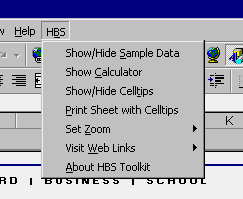
- HBS Menu: Each Tool contains a
special menu that is added to your Excel Toolbar when you
open the Tool. They contain the following resources:
- Show/Hide Sample Data (optional): Toggles in/out the sample data loaded into the tool (note: some tools will not include sample data.)
- Show Calculator: Launches Windows calculator for basic calculations
- Show/Hide Celltips: Toggles in/out red celltips in documented cells
- Print sheet with Celltips: Prints the worksheet you are currently viewing with its documentation cells
- Set Zoom: Provides quick access to 80%, 100%, and 125% zoom levels
- About HBS Toolkit: Launches the about box for the HBS Toolkit